> ## Documentation Index
> Fetch the complete documentation index at: https://docs.subotiz.com/llms.txt
> Use this file to discover all available pages before exploring further.
# Embedded Form
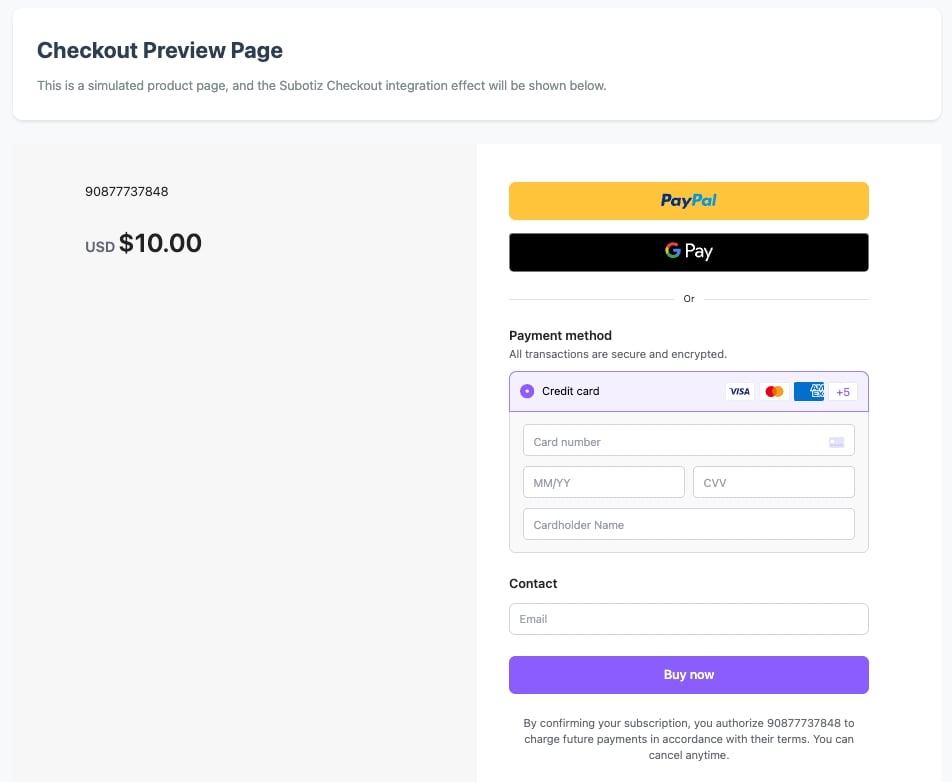
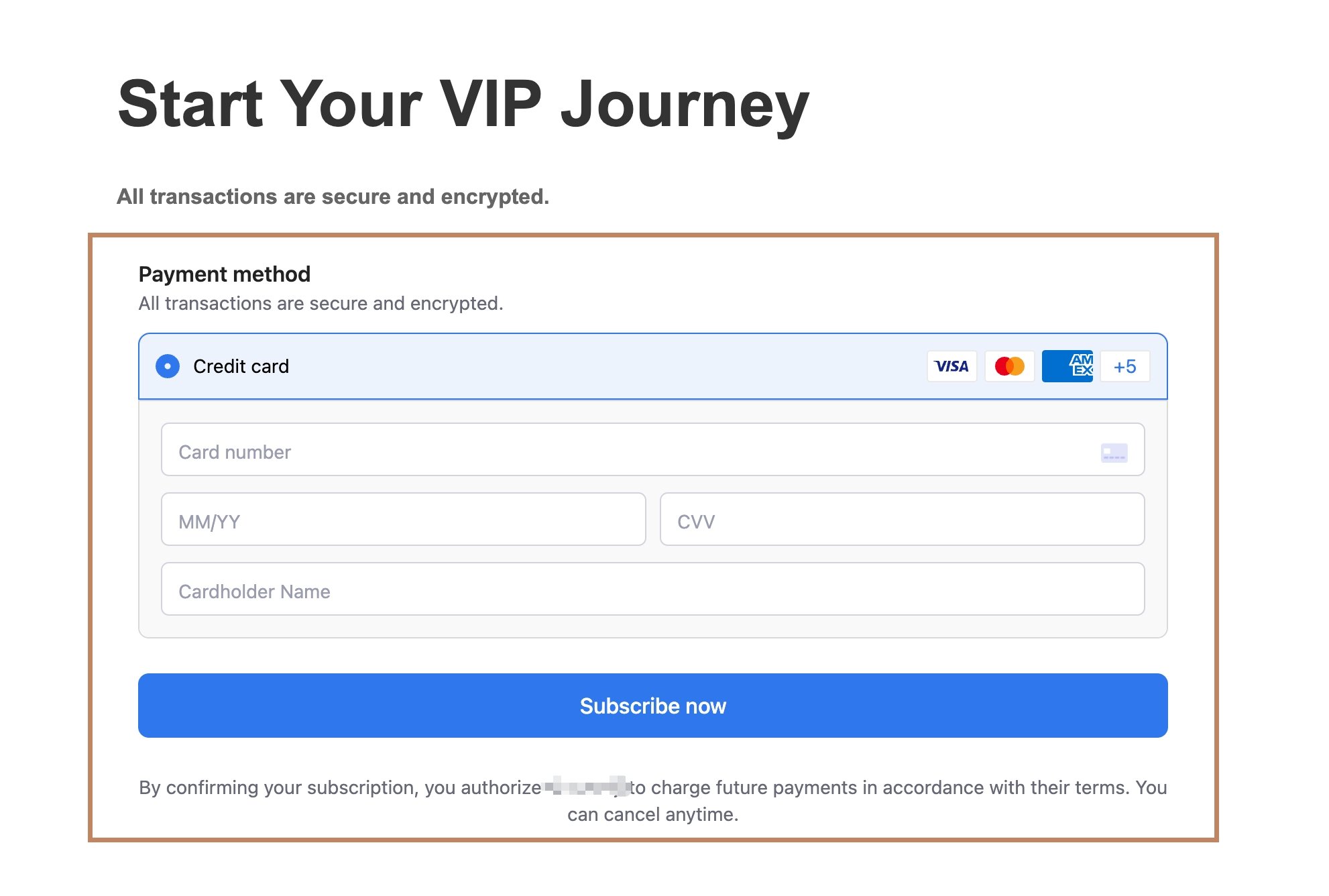
Subotiz supports completing checkout flows through embedded forms, offering a low-code payment integration solution. Easily create customizable payment forms to accelerate your payment implementation.
## Integration Scenario Demos
This page explains how to use the Payment integration mode. This approach involves calling only Subotiz's payment engine, allowing you to fully design and build your own front-end interface and business logic.
If you require comprehensive product management, subscription, and payment capabilities, please proceed to [Embedded Checkout](/en/integration/embedded-form).
#### Embedding a Complete Checkout Page (Red Section)
 #### Embedding Partial Components
 ## Payment Flow
1. When a customer is ready to complete a purchase, initiate a checkout request from your **client-side application** to your **server**. Your server should use the Subotiz API to create a Checkout Session, passing the `order_id` (your platform's unique order identifier) as a parameter to facilitate subsequent association with the trade order.
2. The Checkout Session returns a Session ID. Your client-side application can then use the SDKs to invoke and display the Subotiz payment form to the customer.
3. The customer enters their payment details into the form and completes the transaction.
4. After the transaction is completed, Subotiz will notify your server via a webhook. This notification includes a payment success event containing the `order_id` passed during session creation, enabling you to correlate your platform's order with Subotiz's trade order.
```mermaid theme={null}
sequenceDiagram
participant Customer as Customer
participant Client as Merchant Client
participant Server as Merchant Server
participant SubotizAPI as Subotiz API
Customer->>Client: 1. Initiate Order
Client->>Server: 2. Request Session ID
Server->>SubotizAPI: 3. Create Checkout Session
SubotizAPI-->>Server: 4. Return session Info
Server-->>Client: 5. Return Session ID
Client->>Client: 6. Invoke Form Using SDKs
Client-->>Customer: 7. Display Payment Form
Customer->>Client: 8. Enter Payment Info & Confirm
Client->>Client: 9. Process Payment
Client-->>Customer: 10. Return Payment Result
SubotizAPI->>Server: Webhook Notification with Payment Result
```
## Integration Steps
Create an endpoint to receive events for your account. When an event occurs, Subotiz will send an HTTPS POST request containing a JSON-formatted event object to this [Webhook](/en/webhook/introduction-2) endpoint. You can use these events to keep your system's business data in sync.
Your client-side application can use the [Subotiz SDK](/en/resources/subotiz-sdk) to integrate Subotiz Checkout.
#### 1. Load Subotiz.js
```html theme={null}
```
#### 2. Provide Container Element
```html theme={null}
## Payment Flow
1. When a customer is ready to complete a purchase, initiate a checkout request from your **client-side application** to your **server**. Your server should use the Subotiz API to create a Checkout Session, passing the `order_id` (your platform's unique order identifier) as a parameter to facilitate subsequent association with the trade order.
2. The Checkout Session returns a Session ID. Your client-side application can then use the SDKs to invoke and display the Subotiz payment form to the customer.
3. The customer enters their payment details into the form and completes the transaction.
4. After the transaction is completed, Subotiz will notify your server via a webhook. This notification includes a payment success event containing the `order_id` passed during session creation, enabling you to correlate your platform's order with Subotiz's trade order.
```mermaid theme={null}
sequenceDiagram
participant Customer as Customer
participant Client as Merchant Client
participant Server as Merchant Server
participant SubotizAPI as Subotiz API
Customer->>Client: 1. Initiate Order
Client->>Server: 2. Request Session ID
Server->>SubotizAPI: 3. Create Checkout Session
SubotizAPI-->>Server: 4. Return session Info
Server-->>Client: 5. Return Session ID
Client->>Client: 6. Invoke Form Using SDKs
Client-->>Customer: 7. Display Payment Form
Customer->>Client: 8. Enter Payment Info & Confirm
Client->>Client: 9. Process Payment
Client-->>Customer: 10. Return Payment Result
SubotizAPI->>Server: Webhook Notification with Payment Result
```
## Integration Steps
Create an endpoint to receive events for your account. When an event occurs, Subotiz will send an HTTPS POST request containing a JSON-formatted event object to this [Webhook](/en/webhook/introduction-2) endpoint. You can use these events to keep your system's business data in sync.
Your client-side application can use the [Subotiz SDK](/en/resources/subotiz-sdk) to integrate Subotiz Checkout.
#### 1. Load Subotiz.js
```html theme={null}
```
#### 2. Provide Container Element
```html theme={null}
```
#### 3. Create Checkout Session
Use the [Subotiz API ](/en/api/introduction-1) to create a [Checkout Session ](/en/api/v1-checkout-session-create-checkout-session), and return the response to your frontend.
**Example: Creating a Checkout Session in Embedded Mode:**
```bash theme={null}
curl --location 'https://api.subotiz.com/api/v1/session' \
--header 'Content-Type: application/json' \
--header 'Authorization: Bearer {your_api_key}' \
--header 'Request-Id: dd7fb126-be31-4144-a1af-e4bf4203eb92' \
--data-raw '{
"access_no": "77d52a21dc032b4",
"sub_merchant_id": "2816433",
"order_id": "123e4567-e89b-12-a456-426622201a",
"payer_id": "customer_id_001",
"customer_id": "",
"email": "zhangsan@subotiz.com",
"return_url": "https://www.subotiz.com",
"cancel_url": "https://www.subotiz.com",
"mode": "payment", # Select payment mode when no product data is present
"total_amount": "10", # Amount to collect (required for payment mode)
"integration_method": "embedded", # Choose embedded integration
"redirect_on_completion": "if_required" # Configure redirection behavior; this example only redirects when necessary
}'
```
#### Key Parameters
* `order_id`: Your platform's internal order ID for subsequent business data correlation
* `integration_method`: Set to `embedded` to use the embedded form integration method
* `return_url`: URL to redirect customers to after successful payment on the Subotiz Checkout page
* `mode`: Choose `payment` mode
* `total_amount`: Amount for this checkout session
#### 4. Initialize Checkout Page
```javascript theme={null}
// After importing via the script tag, Subotiz is automatically attached to the window object
const {
Subotiz
} = window;
// Create an SDK instance
const subotiz = Subotiz();
// Initialize checkout
const checkout = await subotiz.initEmbeddedCheckout({
fetchSessionUrl: async() => {
// Fetch the sessionUrl from your server
const response = await fetch('/api/session');
const data = await response.json();
return data.sessionUrl;
},
environment: 'SANDBOX',// 'SANDBOX' | 'PRODUCTION'
// The callback function when the payment completed only triggers when `redirect_on_completion` is set to `if_required` during Checkout session creation
onComplete: () => {
console.log('Payment completed!');
}
});
// Mount to the page
checkout.mount('#checkout-container');
```
## Subscription Renewal Payments
Subotiz supports subscription renewal payments. After a customer completes the initial payment, the system generates a payment credential. Subsequent subscription fees for this customer can be charged using this payment credential without requiring the customer to re-enter payment details.
#### Renewal Process
1. After the customer completes the initial payment, save the `payment_token` data from the payment success event ([trades.succeeded](/en/webhook/trade-1)) to initiate renewal charges.
2. Use the [Create Trade](/en/api/v1-trade-create-trade) API endpoint in the Subotiz API to initiate the charge.
3. Proactively query the trade order or wait for an asynchronous notification to obtain the payment result, then notify the customer accordingly.
```mermaid theme={null}
sequenceDiagram
participant Customer as Customer
participant AccessSystem as Access System
participant Subotiz as Subotiz
Customer->>AccessSystem: 1. Complete Initial Payment
Subotiz->>AccessSystem: 2. Webhook Notification with Payment Result
AccessSystem->>AccessSystem: 3. Save Payment Result
Customer->>AccessSystem: 4. Renewal Payment
AccessSystem->>Subotiz: 5. Create Trade Order to Initiate Payment
Subotiz->>AccessSystem: 6. Return Payment Submission Result
AccessSystem->>Subotiz: 7. Query Trade Order for Payment Result
Subotiz->>AccessSystem: 8. Return Payment Result
AccessSystem->>Customer: 9. Notify Payment Result
Subotiz->>AccessSystem: Webhook Notification with Payment Result
```